Payroll that
manages itself.
Every load event flows straight onto the weekly payroll page, with no line items to add by hand. Set a default driver-pay percentage, adjust any load, defer across the week, and finalize in minutes.
Four steps to payday.
Every load is already on the payroll.
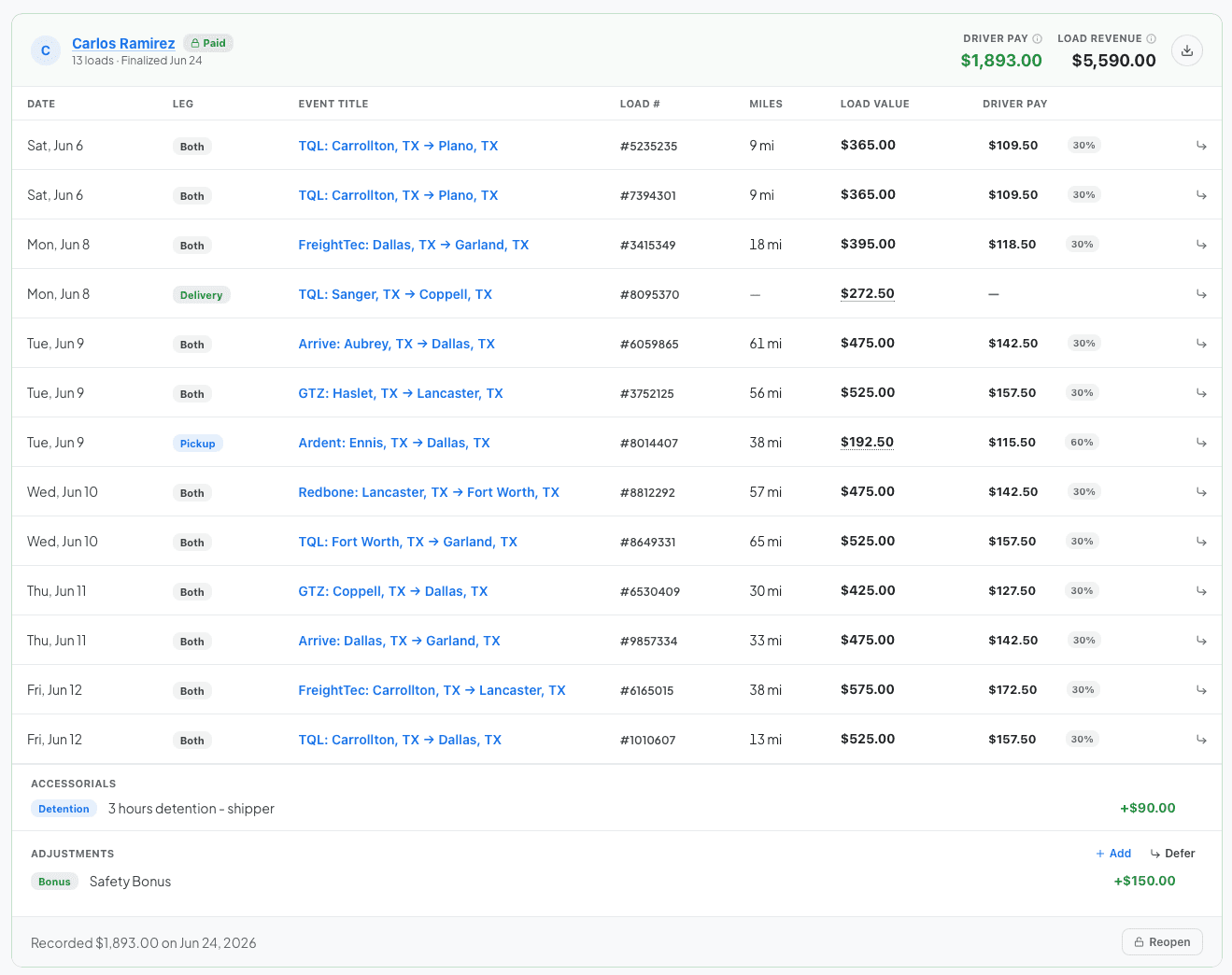
Every load event linked to a driver autofills in the payroll page for the week. From there you can see the event date, total miles, load value and driver pay. You determine what is shared with drivers and what is hidden in their pay stub.
Set the percent once. Override anywhere.
Pick a default driver-pay percentage and FleetCal applies it to every load. You can easily edit the pay for the load in the calendar, and directly in the payroll page when finalizing the week.
Accessorials, bonuses, and deductions, where they belong.
Whenever you request an accessorial like detention from a broker, just click "pay driver" and the amount is automatically added to the week’s pay stub. Add a safety bonus, fuel advance, or deduction in a couple of clicks.

Defer Payments
Whenever a load runs over the weekend, you can simply push the load's pay into a future week. FleetCal makes the adjustments so both weeks reconcile cleanly.
The old way, and the FleetCal way.
Here is what changes the day a fleet moves onto FleetCal.
Close the week in minutes, not hours.
14 days free. No sales call. Your loads, already on the payroll.